Add Travel Time to Calendar Events for Free
If you are like all of us, your calendar shows meetings. It doesn’t show reality.
You book 10:00 → 11:00 → 12:00
But it ignores the one thing that actually matters:
How you get from one place to another.
That’s the gap we fixed with a simple idea inside Actor: Travel Time App automatically add travel time before your events.
What this actually does
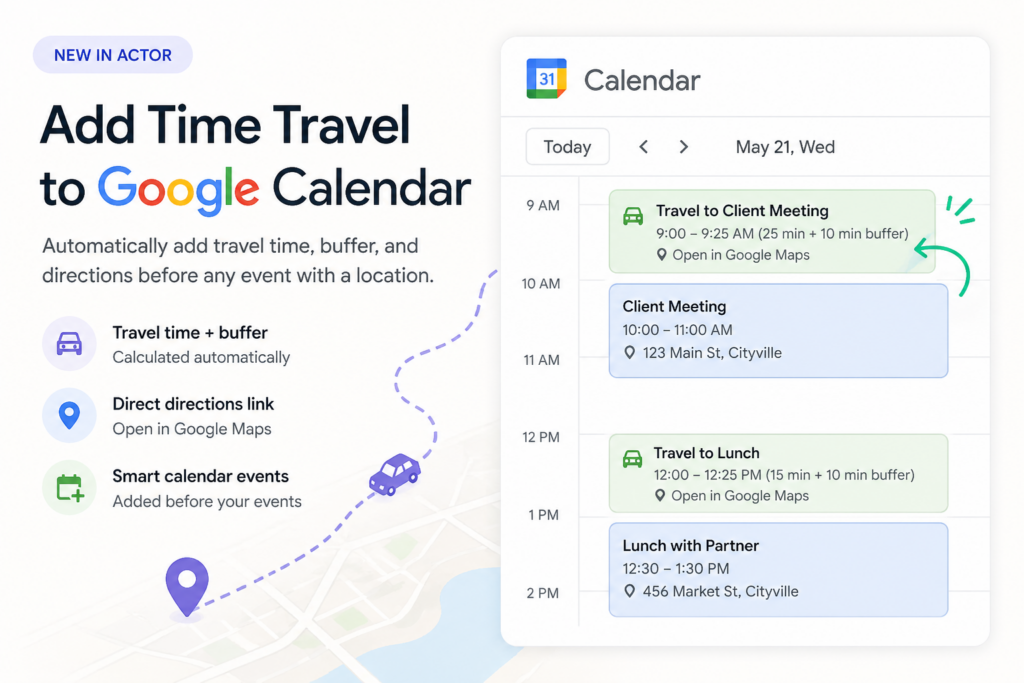
For any event with a location, Actor creates a new event before it that includes:
- Travel duration
- A buffer (because you’re not teleporting)
- A direct link to Google Maps
So your calendar stops being optimistic… and starts being accurate.
Why this matters
Most people don’t have a time problem. They have a transition problem.
Your day breaks not because of meetings, but because of everything between them. This fixes that.
3 simple examples
1. Client meetings across the city
You have a meeting at 11:00 in another area. Instead of realizing too late, your calendar shows:
10:25 — Travel (with directions)
11:00 — Meeting
You leave on time. No stress.
2. Back to back meetings in different locations
10:00 office
11:00 external meeting
Normally, you’d book both.
Now, the system inserts the gap automatically, so you see the conflict before it happens.
3. Personal life logistics
School pickup → activity → dinner
Each step includes real travel time.
No more guessing. No more rushing kids around. Now you know how long does it take.
Try it
If you’re already using Google Calendar or Outlook Calendar, you don’t need to change your setup.
Just connect it to Actor and your calendar becomes ready.
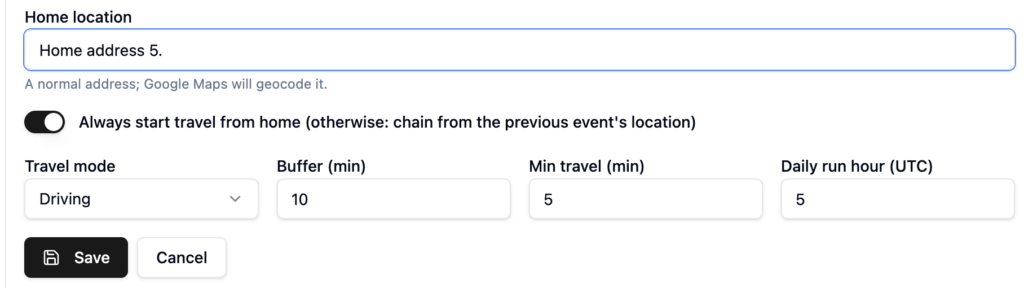
After you choose calendars, you set:
- default home address
- travel mode (car, public transport, biking)
- buffer time and daily run hour.