Less everyday admin.
More time for
your business.
Ask Actor to help with your calendar, tasks, or email from Slack, Teams, or the Outlook add-in. It uses your context to help you get things done with less switching between tools.
Ask when you need help. Set up proactive routines in Studio.
Add a focus block tomorrow at 10.
Actor
Focus time added
Tomorrow · 10:00–11:00 · Project work
Less calendar admin.
Illustrative example. Actor can do even create booking pages or check available time.
Create a task to send the proposal on Friday.
Actor
Task created
Send the proposal · Due Friday
Keep the commitment in your task list.
Illustrative example. You can organize and follow-up on tasks easily
Draft a short reply confirming I received this.
Actor
Reply drafted
Thanks for your message. I’ve received it and will get back to you shortly.
Ready for your review.
Illustrative example. Fast email categorization, drafting, follow-ups.
What does our returns policy say?
Actor
Answer from saved knowledge
“Unused items can be returned within 30 days.”
Example knowledge: saved returns policy
Your business context, close at hand.
Illustrative example. Actor learns from your interactions.
Works with Google Workspace and Microsoft 365.
 Swiss-made. Clear controls for your work and context.
Works across
 Outlook
 Gmail
Gmail Google Calendar
 Microsoft Calendar
 Google Tasks
 Microsoft To Do
 WhatsApp
 Slack
Slack Microsoft Teams
Less time in menus.
More work taken care of.
A calendar change, a task to remember, a reply to prepare. Ask for what you need in the conversation you are already in.
Make room for focused work.
“Add a focus block tomorrow at 10.”
- A focus event in your connected calendar
Protect time for a project without leaving your conversation.
Capture it while it is fresh.
“Create a task to send the proposal on Friday.”
- A task in your connected task list
Keep a commitment visible without opening your task app.
Get past the blank reply.
“Draft a reply to this customer using our returns policy.”
- A contextual draft ready for your review
Spend your time reviewing the reply instead of writing it from scratch.
Examples of separate requests. Available actions depend on your connected accounts and enabled tools.
Useful help, at the right time.
Set up a scheduled briefing, a reminder before a meeting, or an alert for an important email. With Studio triggers and configured actions, Actor can help proactively instead of waiting for another request.
Your business has context.
Actor can work with it.
Give Actor the knowledge, preferences, and reusable material it needs. Keep them in one editable workspace, ready for the next request.
Memory
Keep useful preferences and context, and edit what Actor remembers.
Knowledge
Keep business policies and project information available for relevant requests.
Templates & saved prompts
Reuse your wording and instructions instead of starting from scratch.
When the work repeats,
give it a routine.
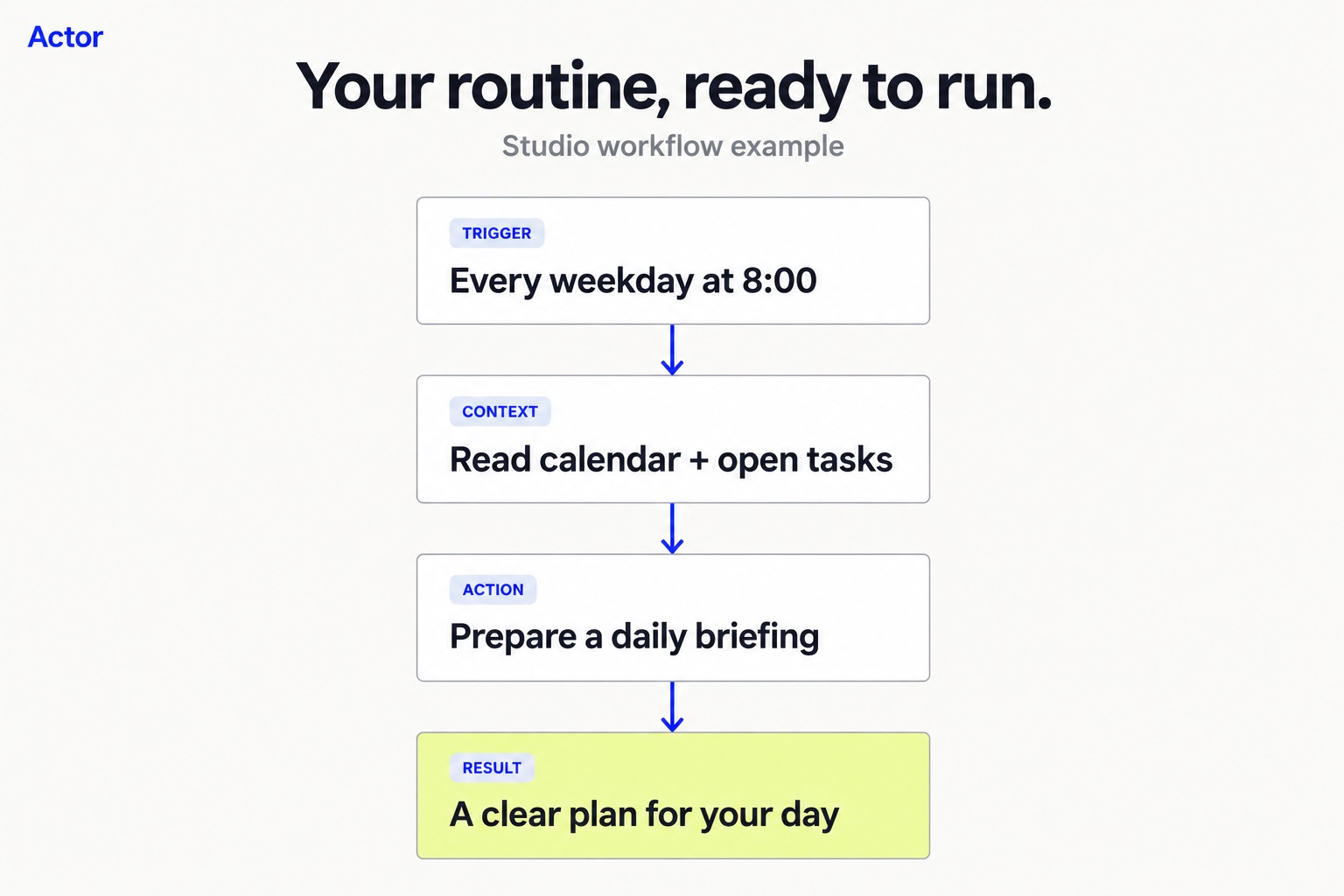
Choose a trigger, then manually configure the actions it should start. Use a template as a starting point, set the rules, and activate the workflow when you are ready.
- A schedule starts your morning briefing.
- An upcoming meeting triggers a reminder.
- A matching email creates a task.
Studio runs the workflow you configure. Review its settings and inspect each run.
Where you talk.
Where the work happens.
Ask from Teams, Slack, the Outlook add-in, or the web app. Connect Google or Microsoft email, calendar, and tasks. Check your day, create a task, or prepare a reply with less time moving between apps.
Also available through WhatsApp and the Gmail Chrome extension. Setup and available actions vary by channel.
Connect. Ask. Make time back.
Connect your work.
Choose the Google or Microsoft accounts Actor should use, and enable the tools you need.
Give Actor a real task.
Start with a focused request: add a calendar event, create a task, or draft a reply. Review the result.
Make the next time easier.
Add useful knowledge, save a template, or manually configure a Studio routine to help at the right moment.
See what happens.
Shape what comes next.
Choose which accounts connect. Review draft replies, inspect Studio run history, and edit saved memory. Workflows follow the actions you configure, including sending when enabled. You can pause them when your needs change.
Your work is personal. Keep it protected.
Clear controls for connected accounts, saved context, and the data Actor uses to help you work.
HIPAA
Support for eligible Business customers under a signed Business Associate Agreement (BAA) and an approved configuration.
GDPR
Data processing terms, privacy controls, and support for your data-protection obligations.
SOC 2 Type I
Actor has completed its SOC 2 Type I assessment. Contact us for the report and assessment scope.
AES-256
We store as little data as possible. What is stored is encrypted at rest with AES-256. TLS protects data in transit.
Customer content is not used to train general-purpose AI models. No human reads your data.
A few clear answers.
What does Actor actually do?
Actor helps with everyday calendar, task, and email work. Ask it to create an event, add a task, find information, or draft a reply using relevant context. Start with a focused request. Studio handles repeatable work through triggers and actions you configure.
Where can I use Actor?
Use Actor in Microsoft Teams, Slack, the Outlook add-in, or its web app. WhatsApp and the Gmail Chrome extension provide additional ways to work. Connect the accounts and services needed for your chosen tasks.
Do I have to build an automation first?
No. Ask Actor for help with a specific task in a conversation. In Studio, you manually choose a trigger and configure the actions to run when it matches or a schedule starts.
How do Memory, knowledge and templates help?
They give Actor reusable context: your preferences, business information, and saved wording or instructions. Review and edit these resources as your work changes.
Will Actor send messages automatically?
A draft is prepared for review. Studio can send or forward messages when you configure a sending action. Review the recipients, actions, and workflow settings before activating it.
Can I start for free?
Yes. Actor has a free plan. Connected accounts, usage allowances, and advanced features depend on your plan. Compare current plans and limits.
What would you like
Actor to take care of?
A calendar event, a task, or a reply. Start with what is taking your time.