

More control on Default Email Labels
Email labeling only works if it matches your workflow.
That’s why we’ve just upgraded default labels in ActorDo.
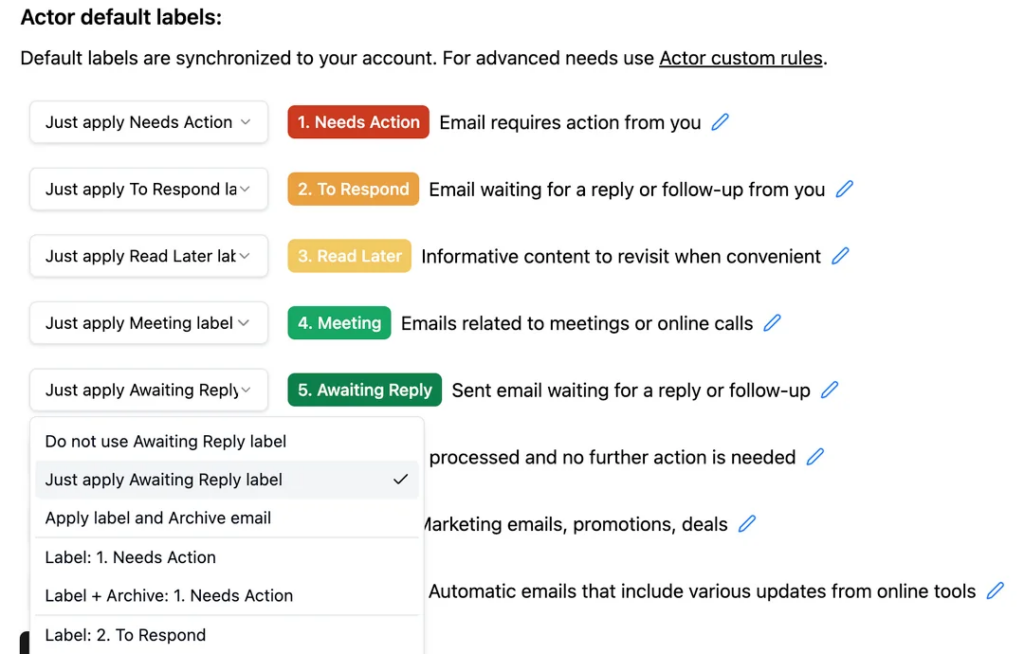
You now get individual actions per label, instead of a one-size-fits-all rule.
What’s new
For every default label, you can choose what happens next:
- Apply label – keep things visible, just organized
- Apply & archive – label it and archive automatically (Gmail)
- Apply & Move – label it and move to another folder (Outlook)
- Disable label – don’t apply it at all
Simple options, but they unlock a lot.
Why this matters
This update gives you real flexibility:
- Use your existing labels (no need to adapt to ours)
- Move emails to folders if you’re on Microsoft
- Translate labels if you don’t work in English
In short: Actor adapts to your inbox, not the other way around.
The bigger idea
AI should help you stay in control, not take it away.
Default automation is great — but only when you can tune it.
This is another step toward making Actor feel less like a tool
and more like a real assistant that works your way.