Looking for an alternative to Jace?
Keep email, calendar and tasks moving with Actor. Ask for help when work changes, and build a Studio workflow when the same job repeats.
Jace brings AI drafts, labels and automation to the inbox. Actor is worth considering when you also want connected task management, more ways to ask, and recurring workflows that start beyond incoming email.
Updated October 30, 2026 · Published by Actor · Based on public product information.
Both can help with your inbox.
Compare what happens next.
Jace: assistance centered on email
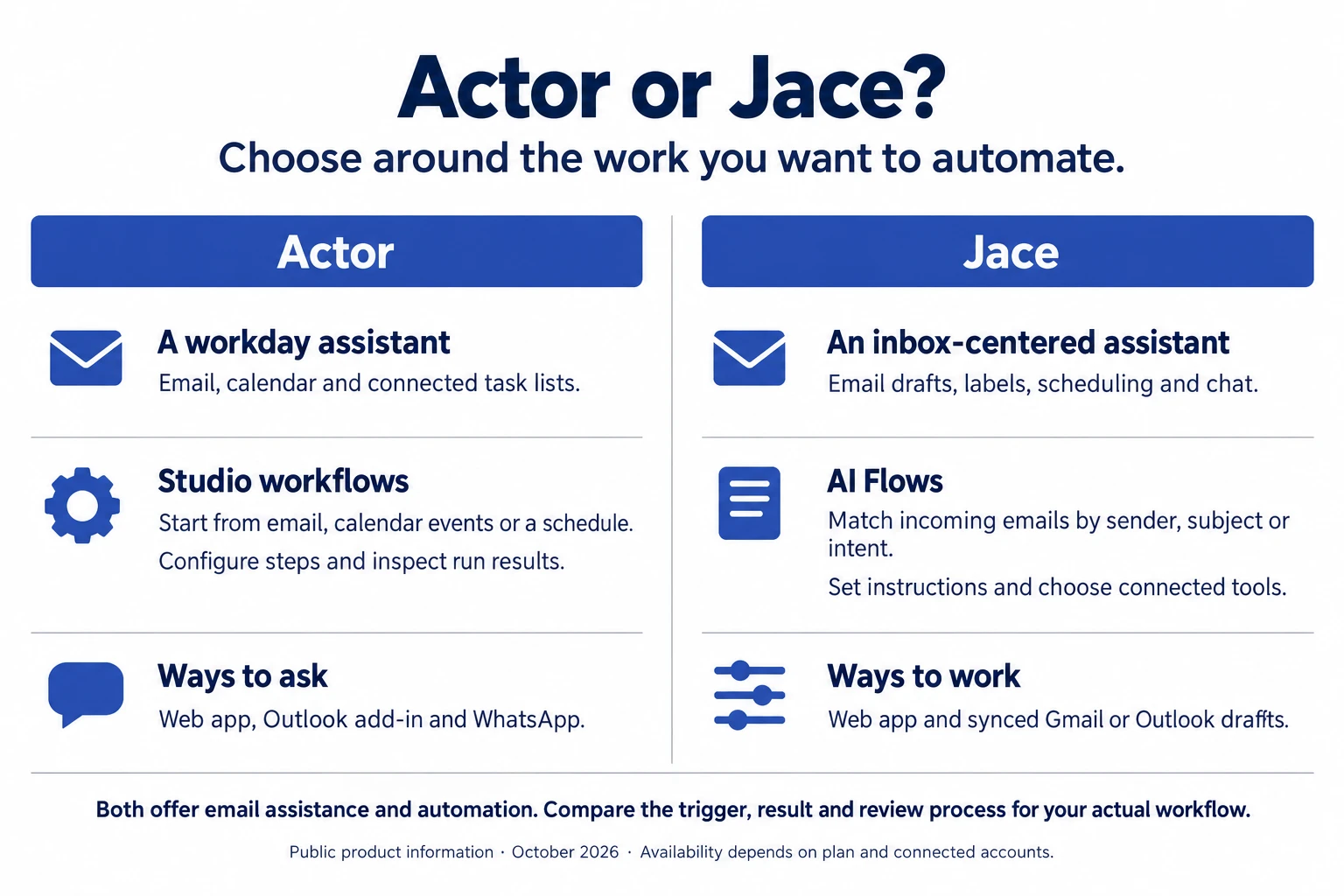
Jace positions itself as an AI executive assistant for inbox organization, contextual replies and business questions. Its features include labels, rules, calendar assistance and actions across connected tools. Explore Jace’s overview →
Its AI Flows guide documents real automation: match an incoming email, choose tools and describe the actions. Automatic sending is optional; drafts are the default.
Actor: assistance across your workday
Ask Actor helps you find context, prepare replies, plan meetings and create tasks. Use the web app, Outlook or WhatsApp to ask for what you need.
Actor Studio gives repeatable jobs a defined trigger and sequence of actions, with results you can inspect. Start from an email, a calendar event or a schedule.
Actor vs Jace
Compare the trigger, the connected tools and the result you need to review.
| What matters | Actor | Jace |
|---|---|---|
| Email providers | Gmail and Outlook, with calendar and task connections. | Gmail and Outlook, including synchronized drafts, labels and folders. |
| Drafting & organization | Prepare replies, label messages and turn requests into connected tasks. | Contextual drafts, AI labels, custom rules and inbox chat. |
| Automation triggers | Studio supports email events, calendar events, bookings, schedules and manual runs. | AI Flows watch incoming emails matched by sender, subject or intent. |
| Workflow setup & review | Configure triggers, conditions and actions. Inspect step results in run history; activate or pause workflows. | Choose tools, describe actions and attach reference documents. Review or edit the saved flow. |
| Tasks & planning | Google Tasks, Microsoft To Do and connected calendars support work beyond the inbox. | Calendar scheduling and actions through connected tools; confirm your specific task-app integration. |
| Where you work | Web app, Outlook add-in and WhatsApp; Slack and Teams in beta. Gmail support through the Chrome extension. | Web app plus drafts synchronized to Gmail and Outlook. Its documentation also describes a Gmail Chrome extension. |
| Integrations | Google and Microsoft work accounts, plus HTTP requests in Studio for external services. | Optional Slack, Notion, Google Drive and other tools; Pro lists custom integrations and MCPs. |
| Starting price | Free plan without a time limit. Premium $15/user/month; Business $25/user/month. | Seven-day trial. Plus $25/month or $20/month billed annually; Pro $50/month or $40/month billed annually. |
| Usage model | Studio run allowances by plan. Premium steps and resource limits may apply. | Monthly credits: 10,000 on Plus; Pro starts at 20,000. Inbox and email-history limits depend on plan. |
Checked October 30, 2026. See Actor pricing, Jace pricing, Jace email sync and AI Flows documentation for current details. Features depend on your plan, permissions and connected accounts. This comparison is not a hands-on performance benchmark.
Give the next step a place to happen.
Keep commitments in your task list
A client email can become a task in Google Tasks or Microsoft To Do. Keep the request connected to the work you need to finish, then ask Actor what is due.
Explore Ask Actor →Start work on your schedule
Use Studio for a morning briefing or meeting preparation. A supported calendar event or recurring schedule can start the workflow without waiting for a new email.
Explore Studio →Choose a convenient entry point
Ask from the web, get help beside a message in Outlook, or use WhatsApp from your phone. The Gmail Chrome extension brings Actor beside your inbox.
Start on a free plan
Actor’s Free plan has no time limit and includes one connected account and limited features. Compare your expected workflows and usage before choosing a paid plan.
Review plans and limits →One client request. Two ways to handle it.
A client emails to ask for a meeting and an updated proposal. Both products can help; the useful comparison is how each fits your follow-through.
With Actor
Ask Actor to find the thread, prepare a reply and create a proposal task. For a recurring routine, configure Studio to respond to a supported trigger and review the step results.
With Jace
Use a matching email to start an AI Flow. Enable draft and calendar tools, then describe the response and scheduling steps. Leave automatic sending off while reviewing results.
Illustrative workflows, not tested outcomes. Review recipients, timing and outputs before enabling automatic actions.
Which assistant fits your workflow?
Consider Actor if…
Your work moves between email, calendar and task lists. You want WhatsApp or an Outlook add-in as an entry point, scheduled routines, and workflow history you can inspect.
Start with Actor →Consider Jace if…
Your priority is contextual email drafting, inbox organization and email-triggered actions. Check its connected tools, account limits and credit allowances against your expected usage.
Visit Jace →Questions about Actor and Jace
Do both work with Gmail and Outlook?
Yes. Both support Gmail and Outlook. Actor also offers an Outlook add-in and Gmail Chrome extension. Jace’s email sync documentation describes drafts and labels synchronized with your existing provider.
Does Jace have workflows, or only email drafts?
Jace has workflows. Its AI Flows use matching incoming emails to trigger instructions and selected tools. Actor Studio also automates work, with email, calendar, schedule and other supported triggers.
Can I use Actor through WhatsApp?
Yes. Actor lists WhatsApp as available alongside the web app and Outlook add-in. Channel setup and availability can vary by account or organization.
How do the pricing models differ?
Actor has a Free plan and paid plans with Studio run allowances. Jace uses monthly credits, with inbox and email-history limits by plan. Compare the Actor plans and Jace plans for the workload you expect.
Can I review responses before they are sent?
Both can prepare drafts for review. Jace documents drafts as the default in AI Flows, with automatic sending optional. In Actor, review drafts and workflow settings, including any send actions, before activating a routine.
HIPAA and GDPR compliance.
Actor is GDPR compliant and offers HIPAA-compliant processing for eligible Business customers under an executed Business Associate Agreement (BAA) and an approved configuration. Contact Actor before using the service to process protected health information.
Review our HIPAA compliance details and Trust Center for scope, data handling and agreements. Compare each provider’s terms against your organization’s requirements.
Start with one request.
Build the routine when it repeats.
Connect your work accounts and see how Actor fits into your day.
Jace is a product of its respective owner. Actor is not affiliated with or endorsed by Jace. Product names are used for comparison.
← All Actor alternatives