
How to Auto-Label Gmail Emails from the Same Sender
Short answer: not automatically in native Gmail.
If you manually label one email thread as NotImportant or ProjectAlpha, Gmail will not learn from that and apply the same label to future emails from the same sender.
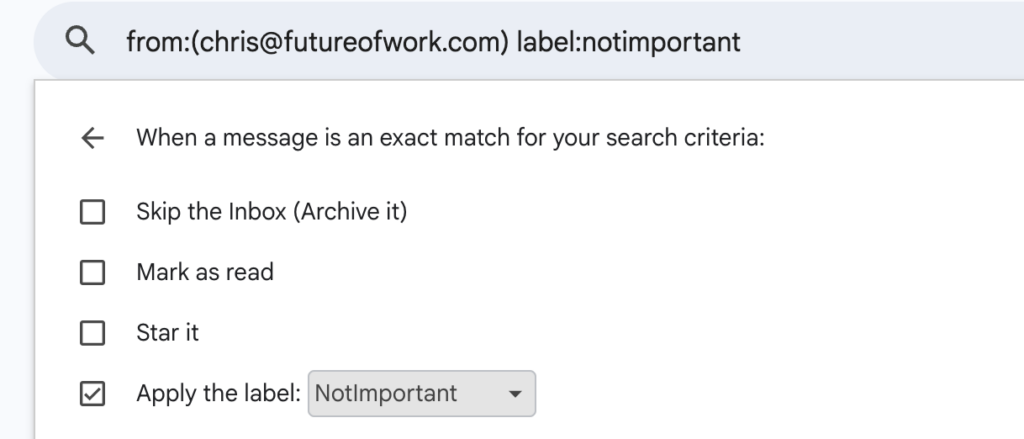
The default workaround is a Gmail filter: if the email is from a specific sender, apply the label NotImportant or ProjectAlpha.
The problem is simple: every time a new sender comes up, you need to edit the filter again.
What to do in Gmail
- Use a filter if you only have a small fixed list of senders
- Use labels to mark existing threads
- Expect some manual upkeep as new contacts appear
A better option: let ActorDo do it
If you want this to work without editing Gmail filters all the time, ActorDo can already handle it.
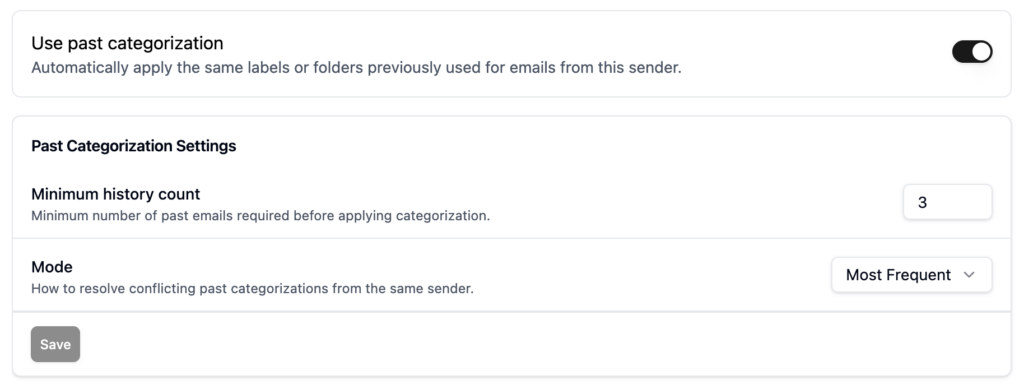
You can easily enable this feature to let ActorDo apply labels based on your past categorization. You can also build custom training rules using AI Training that are more advanced.
This is better than native Gmail filters because you are not limited to a static sender list. You can build logic from real past examples and keep the process flexible.
How to set it up in ActorDo
- Connect your Gmail account
- Open Email Management in ActorDo
- Use AI Training
- Enable Use Past Categorization
- Let it apply labels automatically to future emails
Bottom line
Gmail can do this only with manual sender-based filters. So you need to keep updating the filter whenever a new sender appears.
If you want something that learns from how you already label emails, ActorDo is the faster option. It also works like a real work assistant across email, calendar, and tasks.