Create Public Pages for Calendar Events with AI
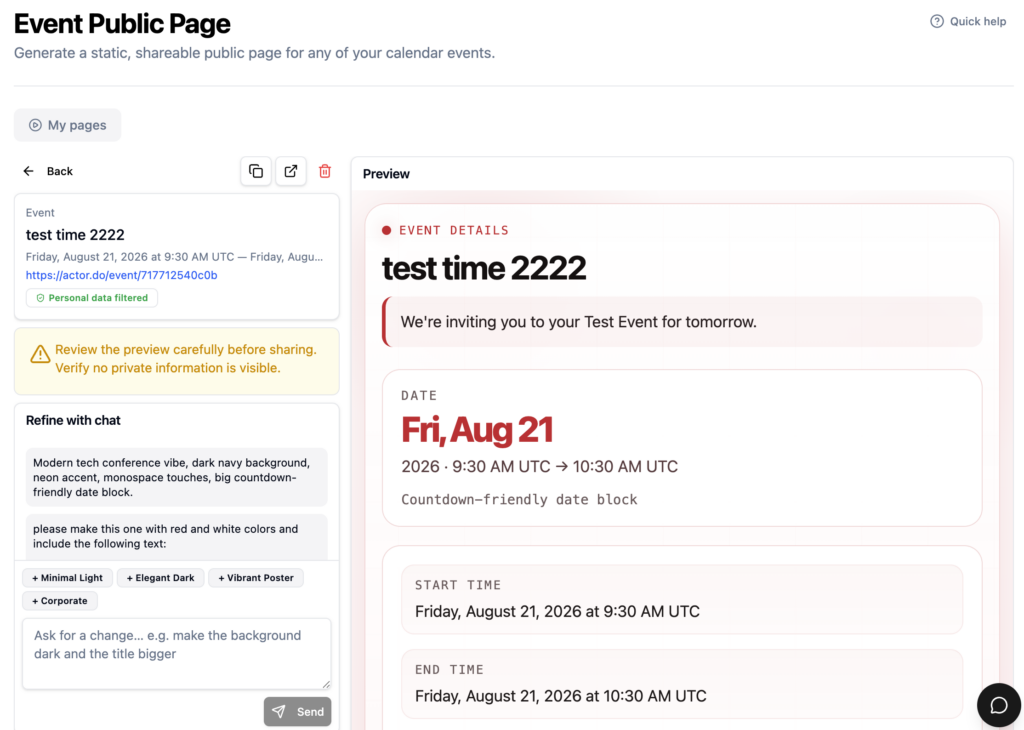
Actor turns calendar events into polished, shareable public pages. Select an event, tell Actor what you want, and receive a public URL you can send to anyone.
Calendar events are excellent for organizing your own schedule. They are not always the best way to present an event to other people.
An event page often needs more than a date, time, and location. You may want to explain what the event is about, add an agenda, introduce the speakers, include instructions, or simply make the information easier to read and share.
Creating that page normally means opening another tool, copying the event details, arranging the content, and making every later change in more than one place.
Actor now makes the entire process much simpler.
Turn an existing calendar event into a public page
With Actor, you can select an event from your calendar and create a public page for it using a prompt.
You might ask Actor to:
- Create a professional page for a customer webinar
- Turn a meeting into a clear event briefing
- Build a friendly invitation for a private gathering
- Add an agenda, preparation notes, or participation instructions
- Rewrite the page for a different audience or tone
Actor uses the calendar event as the starting point, creates the page, and gives it a public URL. You can then share that link by email, chat, social media, or anywhere else your attendees need it.
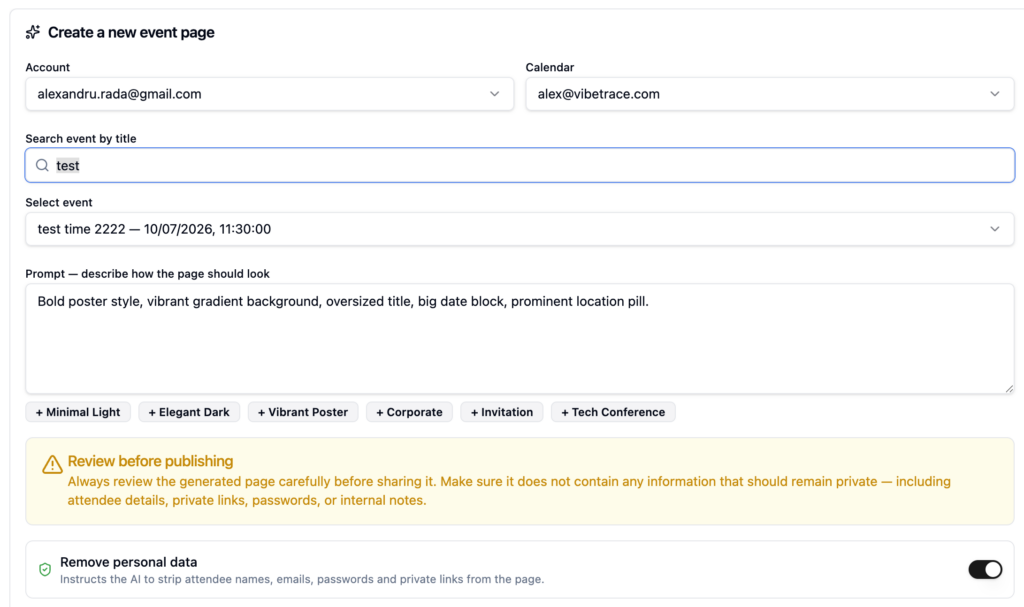
There is no need to build the page manually. You describe the result you want and Actor handles the creation.
How it works
The workflow takes only a few steps:
- Select a calendar event. Choose the event for which you want to create a public page.
- Describe the page. Tell Actor what the page should contain and how it should feel.
- Generate the page. Actor creates the page using the event details and your instructions.
- Share the public URL. Send the link to guests, colleagues, customers, or anyone else who needs access.
The prompt does not need to be complicated. For example:
Create a clean and professional page for this webinar. Add a short introduction, a simple agenda, information about who should attend, and a clear call to join.
Actor turns that request and the existing calendar information into a page that is ready to share.
Change the page by asking Actor
Creating the first version is only part of the workflow. You can also update the page using additional prompts.
Instead of finding the correct section and editing it manually, you can ask Actor to make the change for you:
Make the introduction shorter and more energetic.
Add a section explaining what attendees should prepare before the meeting.
Rewrite the page for customers instead of internal team members.
Make the tone more formal and place the agenda before the speaker information.
This makes the page easy to refine, even when you are not sure how the final copy or structure should look. You can start with a simple request and improve the result through conversation.
Useful for more than webinars
Public event pages can support many different types of calendar events.
Customer meetings
Create a page with the meeting objective, agenda, participants, preparation notes, and other useful context. Everyone receives the same information through one easy-to-share link.
Webinars and online sessions
Present the topic, speakers, schedule, intended audience, and joining information in a format that is easier to understand than a standard calendar invitation.
Workshops and training sessions
Add learning objectives, required materials, an agenda, and instructions for attendees before the session begins.
Internal company events
Turn team meetings, offsites, presentations, or onboarding sessions into organized pages that employees can reference before and during the event.
Social and private events
Create a friendly invitation page for a party, dinner, community gathering, or other occasion, using a tone and structure that match the event.
One event, one link, clearer communication
A calendar invitation is designed to reserve time. A public event page is designed to communicate.
By combining both, Actor helps you keep the convenience of your calendar while giving attendees a clearer and more useful experience. The event remains the starting point, but the public page gives you room to explain, organize, and present it properly.
This also reduces the need to send long follow-up messages containing information that did not fit naturally inside the calendar event. Instead, you can share one URL and update the page when something changes.
Spend less time building pages and more time on the event
Not every calendar event needs a public page. But when an event involves customers, guests, detailed instructions, or information worth presenting well, a basic calendar invitation may not be enough.
Actor closes that gap. Select the event, describe the page you need, and refine it using natural-language prompts. In a few moments, you have a public page that is ready to share.
Try it in Actor and turn your next calendar event into a useful public page.