
How to Manage an Executive’s Calendar: A Hands-On EA Playbook
A customer needs a call today. Your executive is already booked. Someone has placed a “quick sync” over their presentation prep. Meanwhile, a second executive needs the same meeting room.
This is the work: deciding what happens, what moves, and who needs to know.
If you’re moving into an executive assistant role, you can practice these decisions before you own a senior leader’s calendar. Build that experience honestly; claiming responsibility you haven’t held can put you in a role where people expect independent judgment from day one.
Here’s a practical system you can start using, with sample rules, realistic situations, and messages you can adapt.
1. Get the access—and the authority—to do the job
Do you accept invitations through the executive’s inbox? Sometimes. You may handle meeting requests through delegated email access, calendar access, or both. Your company’s setup determines where requests arrive and whether you can respond on the executive’s behalf.
Calendar visibility alone doesn’t necessarily give you permission to accept invitations, edit events, or read private appointments. Have IT set up the appropriate access through your own account. Don’t use the executive’s password.
Before responding to anything, establish these five things:
| Confirm | Practical question |
|---|---|
| Access | “Can I view, edit, and respond on your behalf? Where will meeting requests appear?” |
| Decision rights | “Which meetings can I accept or move without asking?” |
| Priorities | “What are your three most important outcomes this month?” |
| Protected time | “What preparation, focus, personal, and travel blocks should I protect?” |
| Escalation | “How should I reach you when a decision can’t wait?” |
Agree on who normally responds to invitations. If both of you handle the same requests without communicating, you can accept a meeting the executive intended to decline.
Create a one-page calendar brief
Here’s a sample agreement, not a universal rule:
| Item | Executive’s preference |
|---|---|
| Working hours | 9:00–17:30, executive’s local time |
| Focus time | Tuesday and Thursday, 9:00–10:30 |
| Standard meetings | 25 minutes; 50 minutes for complex decisions |
| Lunch | 12:30–13:00; movable with notice |
| Preparation | 30 minutes before board and major customer meetings |
| Travel | Actual journey time plus an agreed arrival buffer |
| Accept independently | Established direct-report 1:1s and approved project reviews |
| Ask first | New external commitments, after-hours calls, and changes to board meetings |
| Redirect | Routine status updates that a project owner can handle |
Keep this brief updated. “Customer meetings come first” is too vague. “Escalations involving our top five accounts may displace internal status meetings” gives you a usable rule.
2. Use a predictable daily checking routine
You don’t need to stare at every calendar all day. You need scheduled checks and a reliable way for urgent changes to reach you.
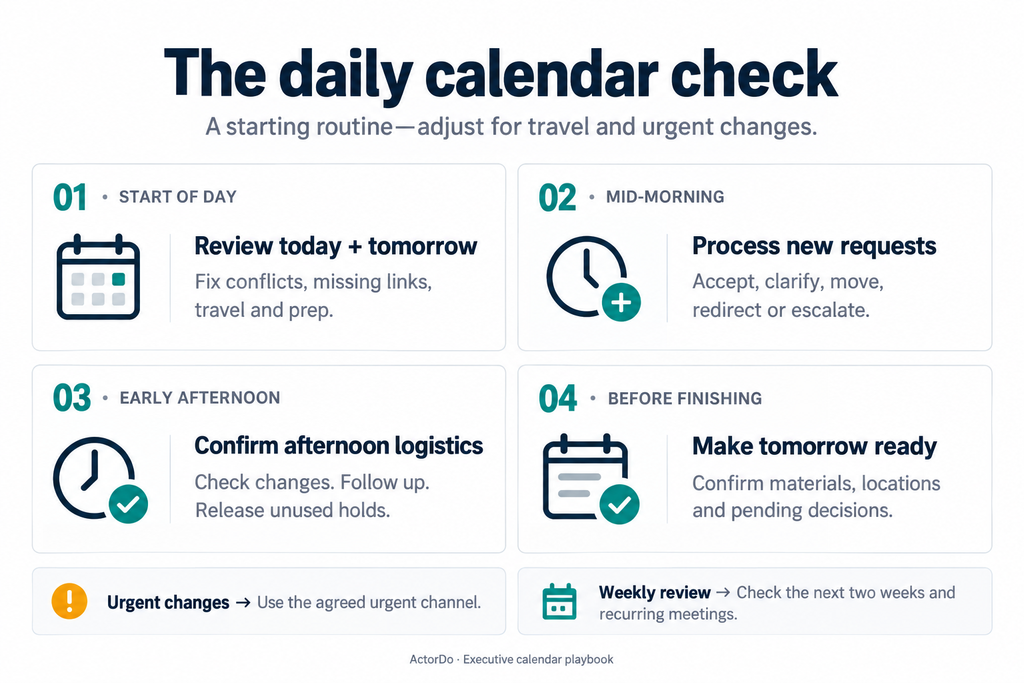
Use this as a starting routine, then adjust it to the executives’ workload:
| When | What you check | What you produce |
|---|---|---|
| Start of day | Today and tomorrow: conflicts, cancellations, locations, links, preparation | A short briefing and a fix list |
| Mid-morning | New requests and changes to today’s meetings | Responses or specific questions |
| Early afternoon | Afternoon logistics and scheduling threads | Confirmed arrangements and released holds |
| Before finishing | Tomorrow’s schedule and outstanding decisions | A ready-to-use calendar for tomorrow |
| Weekly | Next two weeks, recurring meetings, travel, deadlines | Changes before they become urgent |
On a travel day, board-meeting day, or incident day, check more often. Agree on an urgent channel so a same-day cancellation doesn’t sit unnoticed until the next inbox review.
If you support three executives: scan all three for immediate risks first, then process each request queue separately. Keep a distinct calendar brief for each person.
Send a briefing that helps them act
Today: customer renewal call at 10:00; account brief is linked in the invite. The 11:30 operations review moved to 14:00. Leave at 15:10 for the 16:00 onsite meeting. Decision needed by 09:30: should Priya attend the supplier call in your place?
Skip the full calendar transcript. Highlight changes, preparation, movement, and decisions.
3. Give every request one of five outcomes
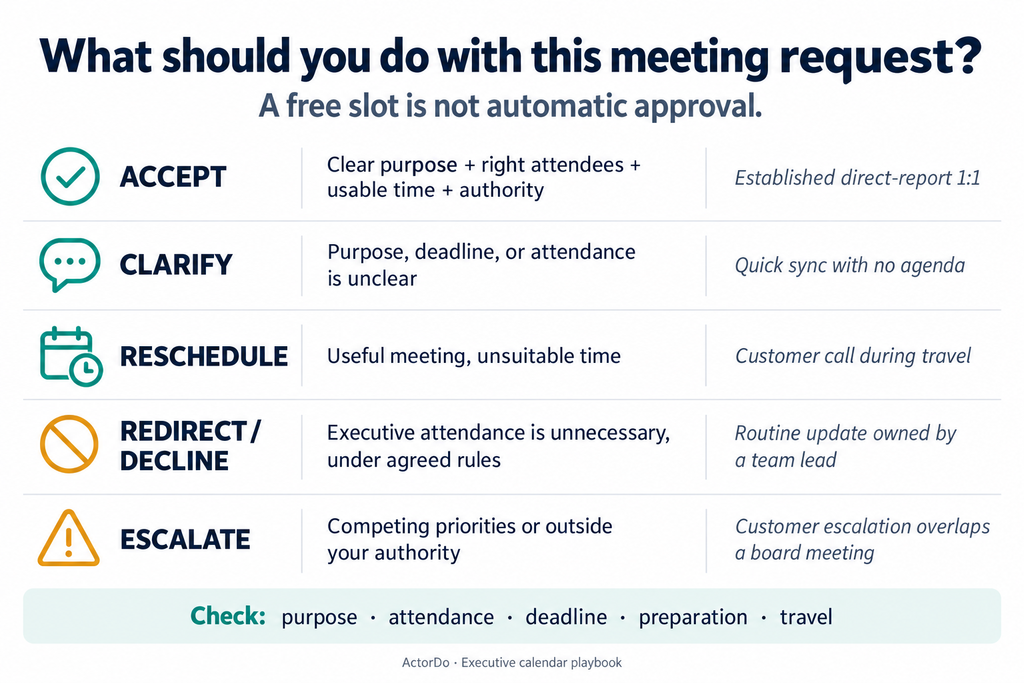
Before accepting, check:
- Purpose: What decision, discussion, or outcome is needed?
- Attendance: Does this executive need to participate?
- Timing: Is there a real deadline? Is preparation required?
- Fit: Is the time usable, including travel and buffers?
- Authority: Can you decide under the agreed rules?
Then choose an outcome:
| Outcome | When to use it | Example |
|---|---|---|
| Accept | Clear purpose, appropriate attendance, usable time, within your authority | An established direct-report 1:1 |
| Clarify | Missing information prevents a decision | “Quick discussion” with no topic |
| Reschedule | Worthwhile meeting, unsuitable slot | Customer call conflicts with approved travel |
| Redirect or decline | Executive attendance isn’t needed, under agreed rules | Routine update owned by a department lead |
| Escalate | Competing priorities or a commitment beyond your authority | Urgent customer escalation overlaps a board meeting |
An empty slot is availability, not approval. Don’t accept a new external commitment just because the calendar has space.
Situation: “Can I get 30 minutes with your CEO?”
The sender is internal, but there’s no agenda.
Send:
Happy to help arrange this. What decision do you need from Alex, who should attend, and when is it needed? If this is an update, could you send a short summary first?
If the answer is “I want to share project progress,” use the executive’s agreed rules to request an update or redirect it. If it’s “We need approval before Friday’s contract deadline,” find decision time with enough preparation beforehand.
Situation: A familiar sender asks for an unfamiliar meeting
You usually accept the CFO’s requests. This one is a two-hour workshop outside working hours.
The sender doesn’t make every request pre-approved. Escalate the unusual commitment:
The CFO requested a two-hour planning workshop Thursday evening. It’s outside your normal hours. Should I confirm, propose Friday morning, or ask whether you’re needed for only part of it?
4. Resolve overlaps without creating new problems
Two events overlap. Don’t immediately move whichever looks less important.
First check whether either is a tentative hold, a duplicate, an optional invitation, or a commitment that can’t move. Then identify the consequence of changing each one.
Situation: A customer escalation overlaps an internal review
At 09:15, an account manager requests a 10:00 customer call. Your executive has an internal operations review at 10:00.
Your agreed rules allow urgent customer escalations to displace routine internal reviews.
- Confirm the customer issue and why the executive is needed.
- Find a replacement slot for the operations review and check required attendees.
- Coordinate with its organizer; don’t assume you can edit someone else’s invitation.
- Confirm the customer call and attach the issue summary.
- Notify the executive and affected attendees.
- Check that the old event was updated or removed and the new invitations are correct.
Message to the internal organizer:
Alex needs to join a customer escalation at 10:00. Could we move today’s operations review to 14:00? The required attendees appear available. Please update the original invitation so there’s one current version.
Situation: A customer escalation overlaps a board meeting
You don’t have authority to move the board meeting. Offer a recommendation:
The customer requests 10:00, which overlaps the board meeting. I recommend that Priya lead the initial call and that you join at 11:30. Shall I coordinate that?
How Actor helps: Actor’s overlapping-event view can help you spot clashes during your calendar review. Use it as a prompt to investigate both events. The priority decision still comes from the executive’s rules and the consequences of moving a commitment.
5. Book the whole commitment, including preparation and travel
A 14:00 meeting across town is more than a 14:00 calendar entry.
For example, if the journey takes 35 minutes and the executive wants to arrive 15 minutes early, block departure from 13:10. Add the return journey too. Recheck actual travel conditions when appropriate.
For an important meeting, check:
- Preparation time and the deadline for receiving materials.
- Exact location, room, entry instructions, or working call link.
- Travel before and after.
- Time to record decisions or send follow-ups.
Situation: The calendar looks free, but the meeting won’t fit
An onsite meeting ends at 15:00. Someone requests a video call at 15:05. The executive still needs to travel back.
Reply:
Alex is travelling after the onsite meeting and can join from 15:45. Would 15:45–16:10 work?
Don’t quietly assume they can take a confidential call from a taxi.
Situation: The board pack arrives late
The board meeting is tomorrow morning. The executive’s preparation block is today at 16:00, but materials haven’t arrived.
Contact the owner:
Alex’s preparation time starts at 16:00. Can you send the pack by 15:30? If it won’t be ready, please send the decisions required and the sections available now.
If that fails, flag the preparation risk to the executive. A preparation block without materials doesn’t solve the problem.
6. Use scheduling links for the right meetings
Public meeting scheduler links are useful when one person needs to choose from approved availability: introductory calls, office hours, or standard partner meetings.
A board meeting involving several leaders, travel, and confidential preparation usually needs direct coordination.
Before sharing a link, decide:
| Setting or rule | Example |
|---|---|
| Meeting purpose | Partner introduction |
| Duration | 25 minutes |
| Booking windows | Tuesday and Thursday afternoons |
| Notice | At least one working day |
| Daily capacity | No more than three introductory calls |
| Buffers | Ten minutes between calls |
| Request details | Company, topic, and expected outcome |
These are the requirements to check in your scheduler; use manual controls where a setting isn’t available. Test the public booking experience before sending it, including time-zone display and what calendar information visitors can see.
Situation: A prospect wants an introduction
You can choose an introductory call here: [meeting link]. Please include what you’d like to discuss so Alex can prepare.
Situation: Someone asks for today, but the link shows next week
The link shows our standard availability. If there’s a deadline before then, please send the context and I’ll check whether we can arrange an earlier conversation.
How Actor helps: Actor’s public meeting scheduler links give invitees a way to select a time without a long email exchange. Offer suitable availability, then review the resulting commitment for context and preparation.
7. Protect focus time with a specific purpose
“Focus time” is easy to overwrite. “Prepare Friday’s pricing recommendation” explains what will be lost if that block moves.
Connect protected time to an actual deliverable:
| Deliverable | Calendar block | Supporting action |
|---|---|---|
| Friday pricing decision | Wednesday, 09:00–10:30: review pricing options | Request analysis by Tuesday afternoon |
| Thursday customer presentation | Wednesday, 15:00–16:00: prepare customer deck | Link the latest deck |
| Monthly board meeting | Two preparation blocks before the meeting | Confirm when the pack will arrive |
Use general titles if the subject is sensitive and the calendar is broadly visible. Store confidential detail in an appropriately restricted location.
Situation: A “quick sync” lands inside preparation time
If your agreed rules allow you to protect the block, reply:
Alex is preparing for Friday’s pricing decision during that slot. Could we use 11:30–11:55 instead? If your meeting affects the pricing decision, please send the context and I’ll review the timing.
How Actor helps: Actor’s suggested focus time can help you identify candidate blocks. Check each suggestion against deadlines, the executive’s preferred working hours, and when inputs will be ready. Ninety free minutes after a deadline won’t help finish the work before it.
8. Support multiple executives without mixing their preferences
One leader likes morning calls. Another reserves mornings for analysis. Keep separate rules, even when they work on the same team.
Maintain a small scheduling queue:
| Request | Executive | Deadline | Status | Next action |
|---|---|---|---|---|
| Renewal escalation | CEO | Today | Awaiting decision | Confirm whether account lead can attend |
| Budget review | CFO | Thursday | Awaiting materials | Request forecast from finance |
| Hiring panel | COO | Friday | Awaiting availability | Follow up with recruiter |
Keep sensitive details out of broadly shared trackers.
Situation: Two leaders must attend the same meeting
- Check both calendars, including preparation and travel.
- Offer two or three workable options to the other required attendees.
- If necessary, place clearly labelled temporary holds with an expiry.
- Confirm one option through the meeting organizer.
- Release every unused hold promptly.
Example hold title: HOLD — budget review — release Tuesday 12:00.
Situation: Both executives have urgent requests
One needs a meeting moved before a call starting in 15 minutes. The other needs options for next week.
Handle the immediate disruption first. Acknowledge the second request with a realistic response time:
I’m resolving a change to this morning’s schedule. I’ll send options for next week by 11:00.
If the executives’ priorities genuinely conflict, ask for a decision with the trade-off stated clearly. Don’t quietly favour whoever messages most often.
9. Catch the small errors that cause big disruption
| Situation | What to do |
|---|---|
| Someone offers “3 p.m.” | Confirm the date and time zone before booking. |
| International recurring call | Check the actual dates, especially around daylight-saving changes. Don’t assume the offset stays fixed. |
| An external organizer changes the time | Recheck conflicts, preparation, and travel before confirming. |
| Executive asks you to cancel an event you don’t own | Decline for the executive or ask the organizer to cancel. Don’t imply the whole meeting is cancelled. |
| An attendee declines | Check whether they’re essential before moving everyone. |
| Recurring meeting needs one change | Confirm whether the change applies to one occurrence or the series. |
| Personal appointment appears | Protect the time without asking for or exposing unnecessary details. |
| Two invitations look identical | Confirm which is current; don’t delete one based only on its title. |
After any change, check the date, time zone, attendees, location or link, and scope of the edit. Then make sure affected people know what changed.
10. Use calendar insights to change next week
Once a week, look for a pattern you can act on.
Useful questions:
- Which recurring meetings still have a clear purpose?
- Where are preparation blocks repeatedly getting displaced?
- How many days have no uninterrupted work time?
- Are meetings overrunning or creating back-to-back pressure?
- Does the allocation of time reflect this month’s priorities?
How Actor helps: Use Actor’s calendar insights to support this review. Treat calendar data as evidence of scheduled time, not proof of attendance, productivity, or business impact.
Situation: Weekly updates occupy four hours
Review the meetings with their owners. If one is purely informational, propose an experiment:
Could we replace the 30-minute Thursday status meeting with a written update for two weeks? If a decision is needed, we’ll schedule a short call with the relevant people.
Make one or two changes, then check whether they helped. Don’t cancel useful meetings just to make the total smaller.
A worked example: Recovering a disrupted Tuesday
Here’s the original schedule:
| Time | Commitment |
|---|---|
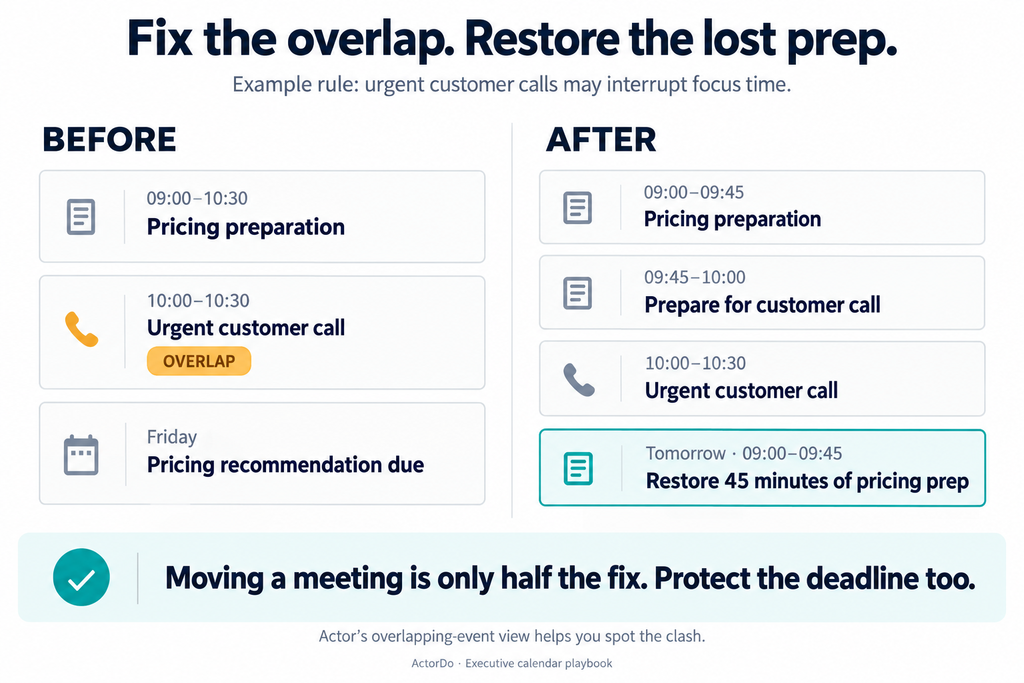
| 09:00–10:30 | Prepare pricing recommendation due Friday |
| 10:30–11:00 | Direct-report 1:1 |
| 11:00–12:00 | Internal project review |
| 12:30–13:00 | Lunch |
| 14:00–15:00 | Customer meeting onsite |
At 08:45, three requests arrive:
- A customer escalation for 10:00.
- A colleague’s “quick catch-up” for 09:30.
- A video call for 15:05.
Under this executive’s rules, urgent customer escalations can interrupt focus time. Routine catch-ups cannot. Travel requires a buffer.
Your actions:
- Confirm that the escalation needs the executive and obtain a short brief.
- Accept the 10:00 call, ending the pricing block at 09:45 to allow preparation.
- Restore the lost 45 minutes of pricing work in a usable slot before Friday.
- Offer the catch-up a later slot and ask what needs discussing.
- Check the onsite address; add outbound and return travel blocks.
- Offer 15:45 for the video call, provided the return journey supports it.
- Check that the escalation can finish before the 10:30 1:1. If it needs longer, coordinate that change too.
Brief the executive:
The customer escalation is confirmed for 10:00; the issue summary is linked. Pricing preparation now runs 09:00–09:45, with the remaining 45 minutes tomorrow at 09:00. I’ve proposed a later time for the catch-up. Departure for the onsite meeting is 13:10, and I’ve offered 15:45 for the video call after your return.
The key detail: you replaced the lost preparation time. Clearing a conflict while leaving an important deadline unsupported would only move the problem.
Your first-week practice plan
You can rehearse this workflow using a sample calendar with fictional attendees:
- Write a one-page brief for an imaginary executive.
- Add 15 meetings, two deadlines, travel, and preparation blocks.
- Introduce five disruptions: an overlap, vague request, late materials, time-zone ambiguity, and cancellation.
- Decide what to accept, clarify, move, redirect, or escalate.
- Draft the messages and check the revised calendar end to end.
In a real role, agree on the rules first, start with decisions within your authority, and review uncertain cases with the executive. As you learn their priorities, you’ll need fewer approvals—but every commitment should still have a clear reason to be there.
Managing a busy calendar? Actor brings overlapping events, public meeting scheduler links, suggested focus time, and calendar insights into your workflow—helping you spot problems and make room for the work that matters.