
How do I combine Google + Outlook calendars?
Managing one calendar is already hard enough.
Managing a Google Calendar, an Outlook work calendar, a personal calendar, a family calendar, and maybe a few shared calendars can quickly become messy.
You check one calendar and think you’re free.
Then you remember your other account has a meeting at the same time.
That’s how double bookings happen.
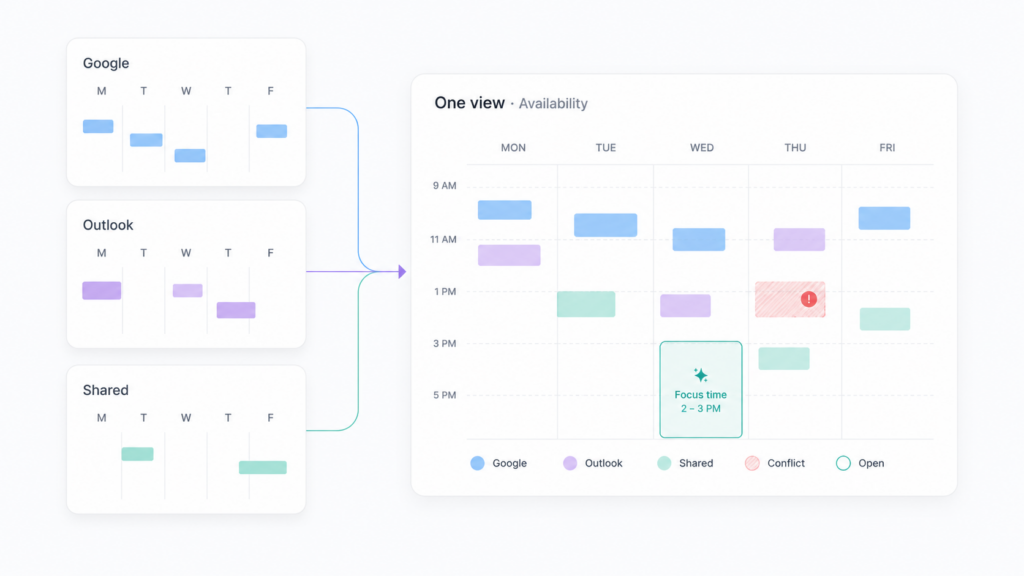
The real problem is not that people need another calendar app. Most people already use Google Calendar or Outlook Calendar. The real problem is this:
Your availability is split across too many calendars.
That’s the problem we’re starting to solve inside ActorDo. Part of Daily Agenda section.
Why combining Google and Outlook calendars is useful
Many people don’t live inside one calendar anymore.
You may have:
- a work Outlook calendar
- a personal Google Calendar
- a family calendar
- a shared team calendar
- a project calendar
- an extra account from another company or client
Each calendar only shows one part of your time.
But when someone asks, “Are you free tomorrow at 2pm?”, you need the full picture.
You don’t need to merge everything into one calendar.
You need one place where you can see your real availability across all calendars.
The common problem with multiple calendars
Most calendar tools let you connect or subscribe to other calendars, but it can still be hard to answer simple questions like:
- Am I actually free next Tuesday?
- Do I have any overlapping meetings?
- Which calendar is blocking this time?
- Can I find two hours for focused work?
- Do I have conflicts between work and personal events?
- What does my real week look like across all accounts?
This becomes even harder when you use both Google and Outlook.
For example, your Outlook work calendar may show you as free, but your personal Google Calendar has a dentist appointment. Or your Google Calendar looks open, but your Outlook calendar has a client call.
That means your availability is technically visible somewhere, but not easy to understand.
Combining calendars should not mean replacing your calendar app
We don’t think ActorDo should replace Google Calendar or Outlook Calendar. I personally use those for various business, clients or projects and they just work well.
Those tools are already good for creating events, inviting people, managing meetings, and syncing with your devices.
ActorDo is different.
The idea is to create an assistant layer on top of your calendars.
Instead of trying to become another calendar app, ActorDo helps you answer:
“What is my real availability across all my calendars?”
That’s the main difference.
What ActorDo’s calendar section does
The new calendar section in ActorDo is built around three simple ideas.
1. View multiple calendars from multiple accounts
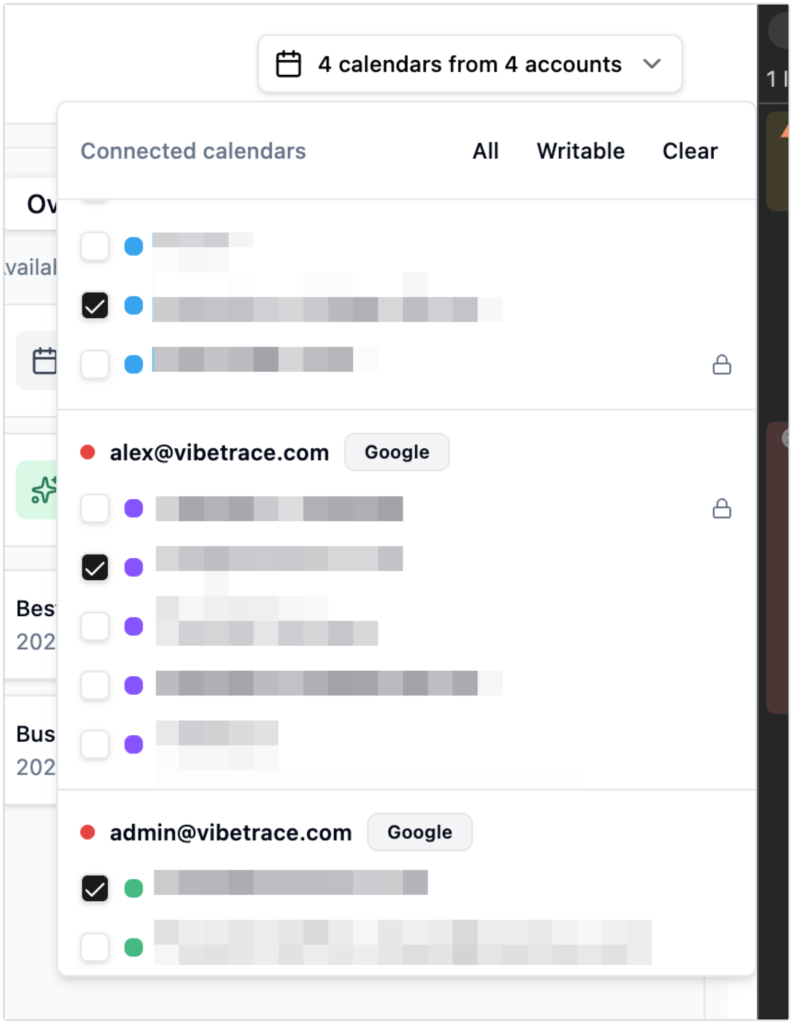
You can connect Google and Outlook accounts, and each account can have one or more calendars.
For example:
- Google personal calendar
- Google family calendar
- Outlook work calendar
- Outlook project calendar
- shared company calendar
ActorDo can show selected calendars together, so you can understand your time across accounts.
This is especially useful if your personal and work calendars are separated.
[Screenshot: connected calendar selector]
2. See scheduling conflicts
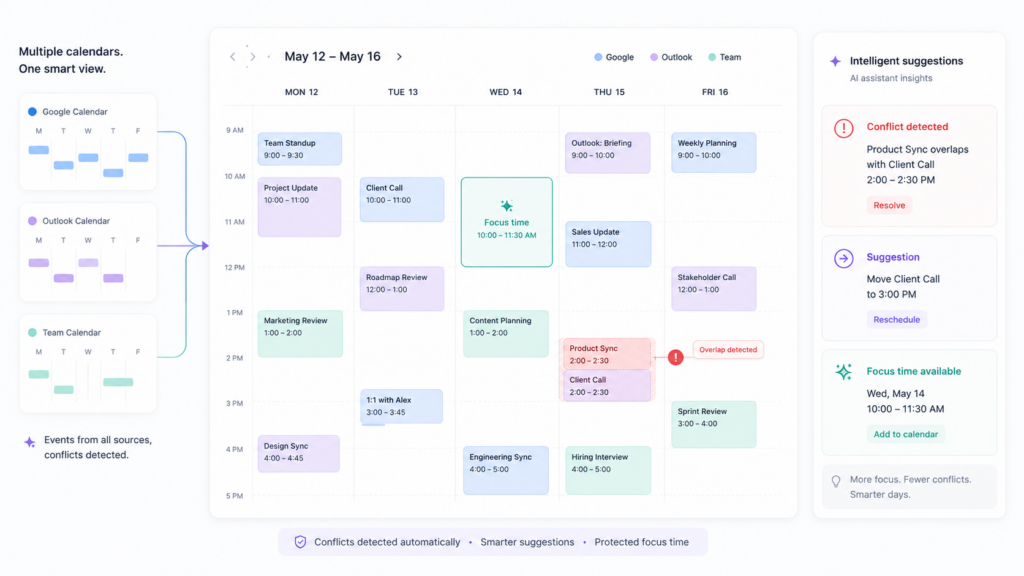
One of the most useful parts is conflict detection.
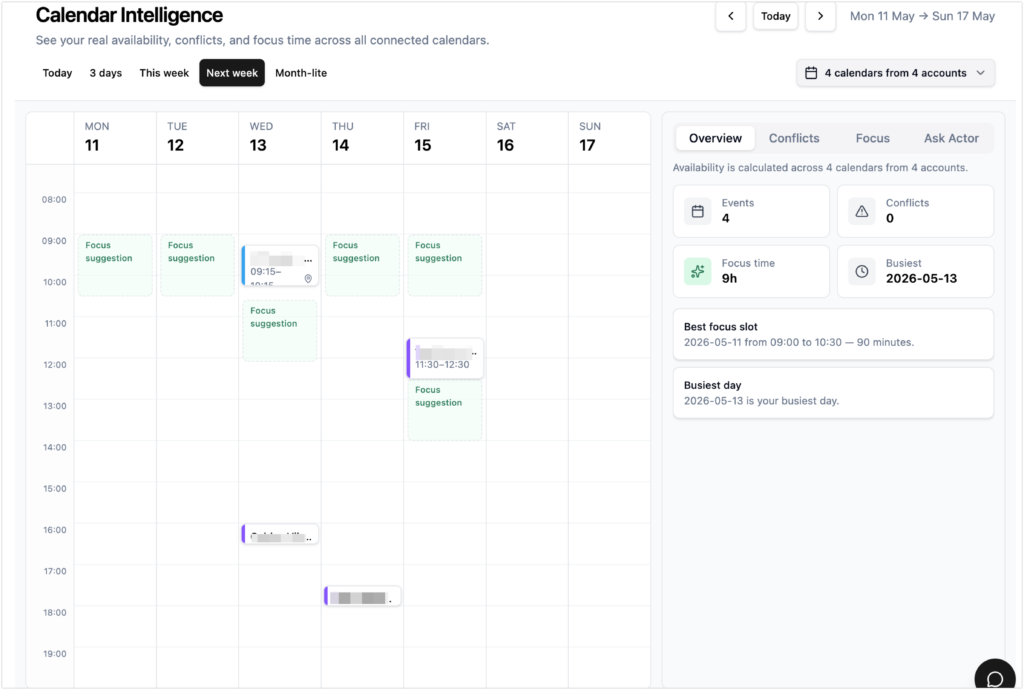
ActorDo can look at selected calendars and find events that overlap.
For example:
Your work call overlaps with a personal appointment by 30 minutes.
Instead of just showing two blocks on top of each other, ActorDo should explain what is happening:
- which events overlap
- when the overlap happens
- which accounts/calendars are involved
- whether the conflict looks important
This helps you catch problems before they become stressful.
[Screenshot: calendar conflict view]
3. Find focus time across calendars
Another useful part is finding free time.
It’s not enough to look at one calendar and see an empty space. That time may still be blocked in another account.
ActorDo can look across selected calendars and suggest realistic focus blocks.
For example:
Friday 09:00 to 11:00 looks like your best free block this week.
This is useful for deep work, admin tasks, planning, writing, or anything that needs uninterrupted time.
[Screenshot: focus time suggestions]
Example: Google personal + Outlook work calendar
Imagine this setup:
- Your work meetings are in Outlook
- Your personal appointments are in Google Calendar
- Your family events are in another shared Google Calendar
In a normal workflow, you may need to check all of them manually.
In ActorDo, you should be able to select those calendars and see one combined view.
Then Actor can help answer:
- “Do I have conflicts next week?”
- “When am I free tomorrow?”
- “Find me 90 minutes for focused work.”
- “Which day is less busy?”
- “Show me only work-related events.”
- “Can I move this meeting?”
This turns the calendar page into something more useful than just a visual schedule.
It becomes a small planning assistant.
Why this matters
The more accounts you have, the easier it is to lose control of your schedule.
You may miss conflicts.
You may say yes to meetings when you’re not really free.
You may never protect time for focused work.
You may spend too much time checking calendars manually.
Combining Google and Outlook calendars is not just about convenience.
It helps you make better decisions with your time.
What we are building now
The first version of ActorDo’s calendar section focuses on:
- viewing selected Google and Outlook calendars together
- showing availability across multiple accounts
- detecting overlapping events
- listing scheduling conflicts
- suggesting focus/work blocks
- letting you ask Actor questions about your schedule
It is intentionally simple.
We are not trying to build a full calendar replacement.
We are building a better way to understand your real availability.
Final thought
If you use only one calendar, this may not feel like a big problem.
But if your time is split across Google, Outlook, work, personal, family, and shared calendars, then your calendar is not really one calendar anymore.
It’s a fragmented view of your life.
ActorDo’s goal is to bring that together and help you answer the most important question:
“When am I actually available?”