
Calendar Synchronization App: Sync Calendars Daily
Automatically copy events between calendars with Actordo. Schedule daily calendar synchronization, choose a date range, and control which details are copied.
This works also between Google and Outlook calendars (both ways). This way you can copy Google Calendar events to your Outlook Calendar and also the other way around.
Calendar Synchronization: Keep Your Calendars in Sync
Managing separate calendars for work, personal plans, or different accounts often means copying the same events more than once. Actordo’s Calendar Synchronization app handles that routine for you, copying events from a source calendar to a target calendar on a daily schedule.
Bring personal commitments into your work calendar or copy events between accounts so your schedule is easier to follow. Try it with Google and Microsoft Outlook calendars.
How calendar synchronization works
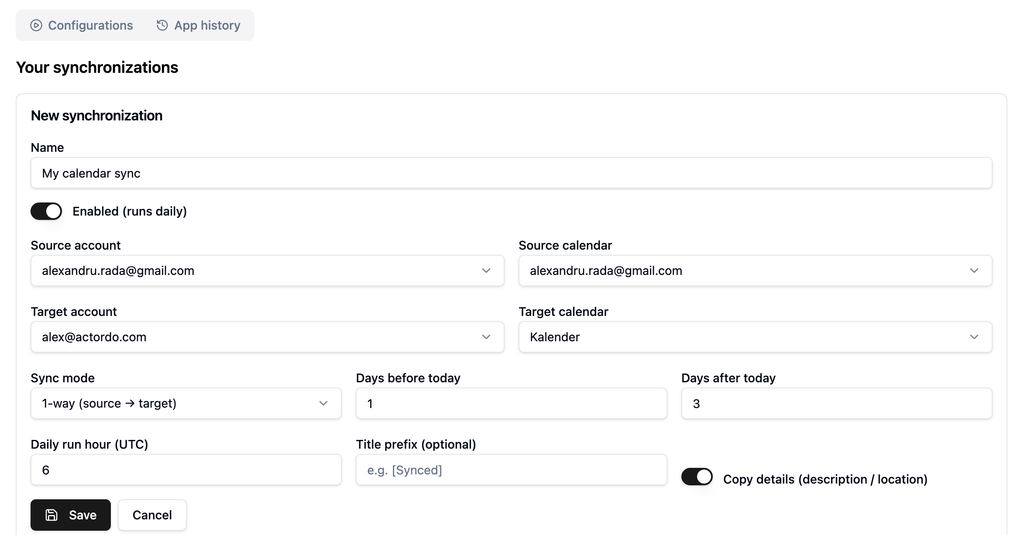
Choose the account and calendar you want to copy events from, then select the destination account and calendar. With one-way synchronization, events flow from the source to the target.
You control what gets copied and when:
- Daily schedule: Choose the hour your synchronization runs, in UTC.
- Flexible date range: Set how many days before and after today to include.
- Optional title prefix: Add a label such as “[Synced]” to make copied events easy to recognize.
- Event details: Choose whether to copy descriptions and locations.
Give your configuration a name, enable it, and save. Actordo runs it daily using your settings.
Keep relevant events together
Calendar synchronization is useful when your commitments live across multiple accounts. You can copy upcoming appointments into the calendar you check most often or bring events from another account into your daily planning view.
For example, you could include events from yesterday through the next seven days, run the synchronization each morning, and add a title prefix to identify the copied entries.
Because synchronization runs daily, your chosen run time determines when events are copied.
Spend less time copying calendar events
Set up your source, destination, and schedule once, then let Actordo handle the daily copying.
Open Calendar Synchronization in Actordo and create your first synchronization.