The Actordo Dashboard Now Speaks Your Language
Using Actordo should feel natural from the moment you log in. That’s why we’ve translated the dashboard interface into multiple languages, giving you more choice in how you navigate your workspace.
Whether you’re more comfortable working in Italian, German, Japanese, or another supported language, you can now choose an interface that feels familiar.
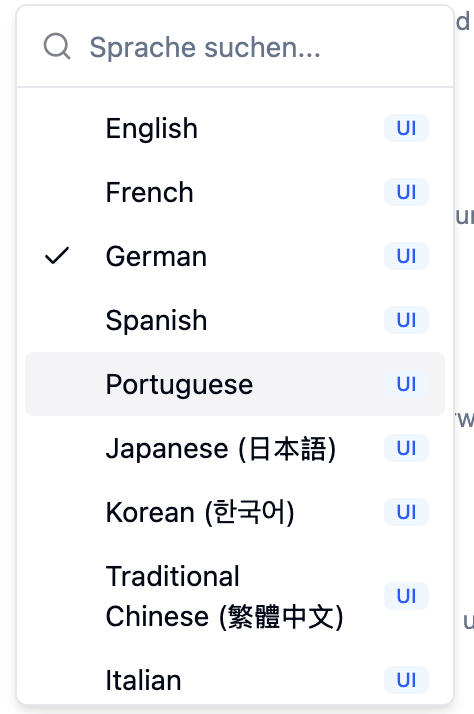
Nine languages, one familiar dashboard
The Actordo dashboard is now available in:
- English
- French
- German
- Spanish
- Portuguese
- Japanese (日本語)
- Korean (한국어)
- Traditional Chinese (繁體中文)
- Italian
This update brings translation to the dashboard’s user interface, making it easier to find your way around Actordo in your preferred language.
Less translating. More doing.
When you’re focused on your work, mentally translating an interface is an extra step you shouldn’t have to take.
A dashboard in your preferred language can make everyday interactions more intuitive, whether you’re exploring Actordo for the first time or returning to a familiar workflow. It also makes getting started more welcoming for people who prefer to use software in a language other than English.
Choose your preferred language
Open the dashboard’s language selector and choose from the available options. You can see the supported languages together, with a checkmark identifying your current selection.
This update is a step toward making Actordo more accessible to people working across languages and locations. We’d love to hear how the translated interface feels—and which language you’d like us to support next.
Open your Actordo dashboard and try it in your preferred language.