Actor Studio vs Ask Actor: Automation or Agentic Mode?
Actor gives you two ways to get work done:
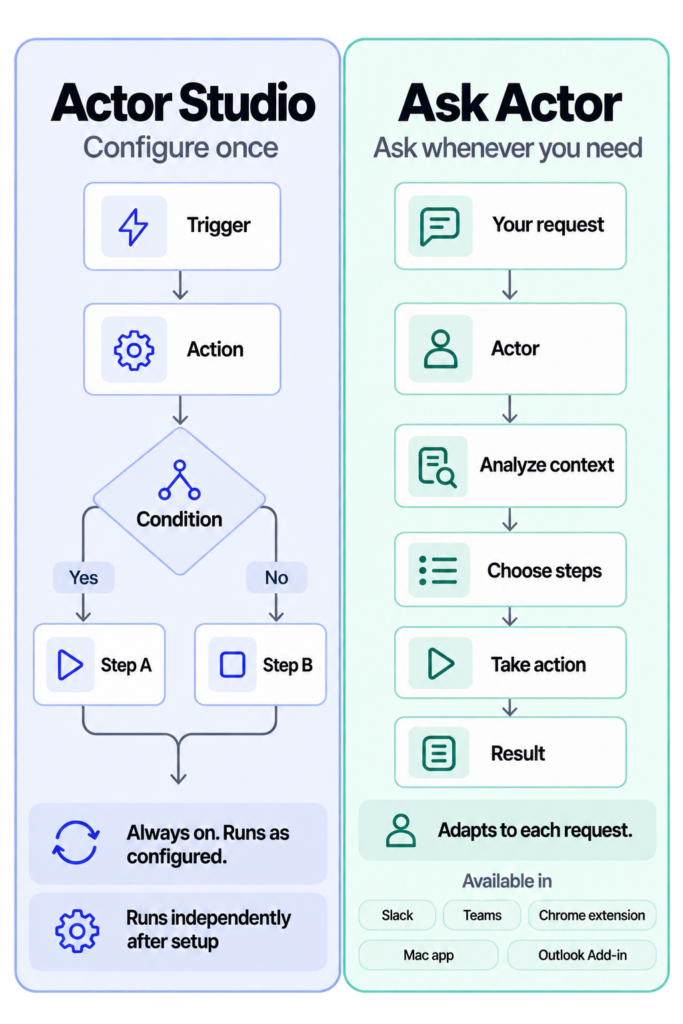
- Actor Studio runs repeatable workflows you configure in advance.
- Ask Actor uses agentic mode to understand a request, choose the steps, and act when you ask.
The simple rule: use Studio for work that repeats and Ask Actor for work that changes each time.
Actor Studio: configure once, run automatically
In Studio, you define the workflow: a trigger starts it, conditions decide the path, and actions do the work. Once enabled, it runs independently in the background.
Use Actor Studio when the process is predictable, for example:
- Label every incoming email by purpose.
- Create a task when an important message arrives.
- Prepare a weekly email or calendar digest.
- Notify you before selected meetings.
Studio gives you consistency and control because the same logic runs every time.
Ask Actor: describe the goal, let Actor plan
Ask Actor is on-demand and agentic. You describe the result you want in natural language. Actor reads the available context, decides which steps are needed, takes the actions, and returns the result.
Use Ask Actor when the request is specific or the path may change, for example:
- “Summarize this email thread and draft a short reply.”
- “Find my free time next week and suggest three meeting slots.”
- “Review today’s emails and create tasks for anything I must do.”
Ask Actor adapts to each request. You can use it from Slack, Microsoft Teams, the Chrome extension, the Mac app, or the Outlook Add-in.
Which one should you use?
| Choose Actor Studio when… | Choose Ask Actor when… |
|---|---|
| The work happens repeatedly | You need help right now |
| The rules are known in advance | The task needs interpretation |
| You want it to run without prompting | You want Actor to choose the steps |
| Consistency matters most | Flexibility matters most |
| Tracking every run for monitoring, troubleshooting and accountability | It focuses on completing the request, no tracking or observability |
You do not have to choose only one. A useful pattern is to start with Ask Actor for a new task. If you keep asking for the same thing, turn it into a Studio workflow.
In one sentence
Actor Studio is automation you design; Ask Actor is an agent you direct.
Try Actor free or learn more about Actor Studio triggers and actions.